Last updated:
Quick answer (11 November 2026): WhatsApp usernames are the app’s biggest privacy change in years: you will be able to chat with new people without showing your phone number. Meta opened username reservations at the end of June 2026 (Settings → Account → Username), with the full feature promised later this year. Usernames are 3–35 characters, there is no public directory, and an optional username key stops strangers from messaging you. You still need a phone number to sign up, and contacts who already have your number keep seeing it. WhatsApp is also testing a Contacts tab that would replace Communities in the bottom bar. Winners: privacy-conscious users, sellers and creators. Risk: impersonation scams.
What happened
For 17 years, a phone number was the only way to reach someone on WhatsApp — so joining a group or messaging a business exposed your number to strangers. In June 2026 Meta announced usernames for WhatsApp’s roughly three billion users and let people reserve one before the worldwide launch.
What is being added
| Feature | How it works | Status |
|---|---|---|
| Usernames | A unique name (3–35 characters) people can use to start a chat instead of your number | Reservation open since late June 2026; full launch promised for later in 2026 |
| Username key | An optional code someone must know to message you by username | Announced with usernames |
| Reserved names | Names of celebrities, public figures and governments are held back | In place |
| Contacts tab | A new tab for saved contacts with sorting options, replacing Communities in the bottom bar | Testing with some Android beta users; no release date |
| Instagram Reels shortcut | Share Reels into chats more directly | Android beta |
What does not change
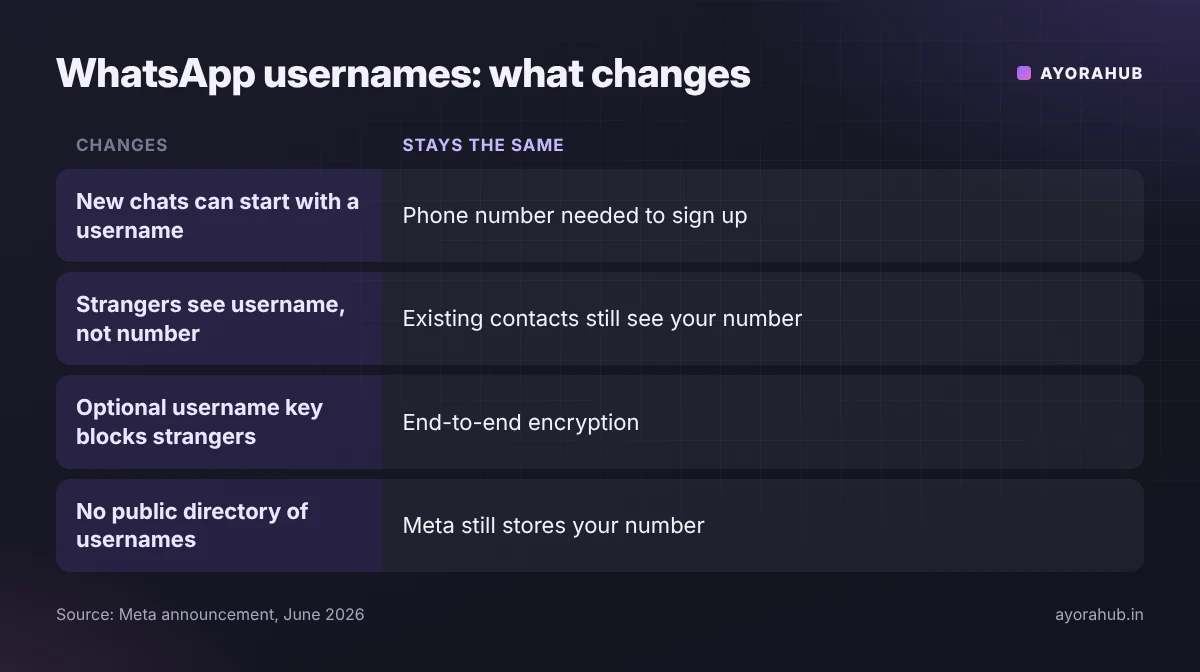
- You still need a phone number to create an account.
- People who already have your number still see it.
- Meta still stores your number; the username only hides it from people who have not saved it.
- Chats remain end-to-end encrypted.
How to reserve your WhatsApp username
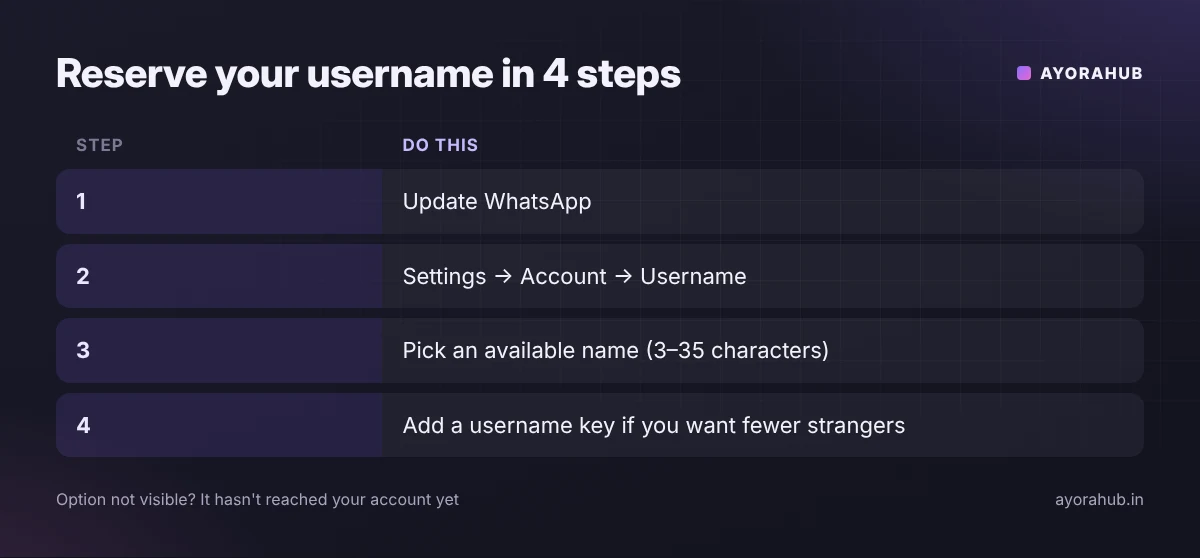
- Update WhatsApp to the latest version.
- Open Settings → Account → Username.
- Type the name you want; WhatsApp tells you if it is available.
- Confirm. You can reserve even before the feature is live in your country.
- When offered, set a username key if you want to block messages from strangers.
If you do not see the option yet, it has not reached your account — keep the app updated.
Who gains
- Everyday users: join groups, buy and sell, or contact a stranger without handing over a number.
- Women and public-facing workers, who face the most harassment from leaked numbers.
- Small businesses and creators: a simple handle to print on posters and profiles — pair it with a QR code (how to make one free).
- Meta: WhatsApp becomes easier to use as a public and business platform.
Who could lose — and the risks
- Impersonation: scammers may register names that look like brands, banks or people you know.
- Username squatting: popular names get taken early — one reason to reserve yours now.
- Telemarketers and data brokers who relied on harvested phone numbers.
- Communities, which becomes less prominent if the Contacts tab replaces it.
Stay safe with usernames
- Do not trust a username just because it looks official; check verified badges and official websites.
- Never share OTPs, UPI PINs or passwords in chat, whoever asks.
- Turn on two-step verification in Settings → Account.
- Use the username key if you only want known people to reach you.
More safety guides: fake CAPTCHA scams and this month’s security updates.
Tools we recommend · Affiliate links: we may earn a commission if you sign up, at no extra cost to you.


Frequently Asked Questions
What is a WhatsApp username?
A unique handle that lets people start a chat with you without knowing your phone number.
How do I reserve a WhatsApp username?
Go to Settings → Account → Username in the latest version of the app.
Does a username hide my phone number from everyone?
No. It hides it from people who do not already have your number. Existing contacts still see it.
Can I use WhatsApp without a phone number?
No. A number is still required to create an account.
What is the username key?
An optional code that people must know before they can message you through your username.
The bottom line
Usernames fix WhatsApp’s oldest privacy weakness without changing how the app feels. Reserve your name early, add a username key if you want fewer strangers in your inbox, and treat unfamiliar handles with the same caution you would give an unknown phone number.
More from Tech News
- OpenAI’s Businesses in ChatGPT: who wins and who loses
- Google Assistant is shutting down: what Gemini changes
- Microsoft Publisher has ended: save your .pub files
- Why phone prices are rising in 2026
How we report tech news
Each AYORAHUB news explainer follows the same structure: what happened, what is being added, what is going away, who gains and who loses, and what you should do. We use company announcements and established publications, name our sources, separate confirmed facts from reports and forecasts, and update the article when the story changes. Last checked: 11 November 2026.