
What is GitHub Copilot?
GitHub Copilot is an AI coding assistant available in supported developer tools and workflows. Exact capabilities depend on the subscription, IDE, organisation settings and current product release.
Key uses
- Suggest code while typing and help draft routine functions.
- Explain unfamiliar code and propose refactoring ideas.
- Help create tests, documentation and debugging hypotheses.
- Support coding conversations in eligible environments.
Benefits
Can reduce repetitive work and help developers explore implementation options, especially when they provide context and verify the generated code.
GitHub Copilot plans and pricing (November 2026)
| Plan | Price (USD) | Who it is for |
|---|---|---|
| Free | $0 | Trying Copilot; limited usage |
| Pro | $10/month ($100/year) | Individual developers |
| Pro+ | $39/month ($390/year) | Heavy individual use, more advanced models |
| Business | $19/user/month | Teams |
| Enterprise | $39/user/month | Large organisations |
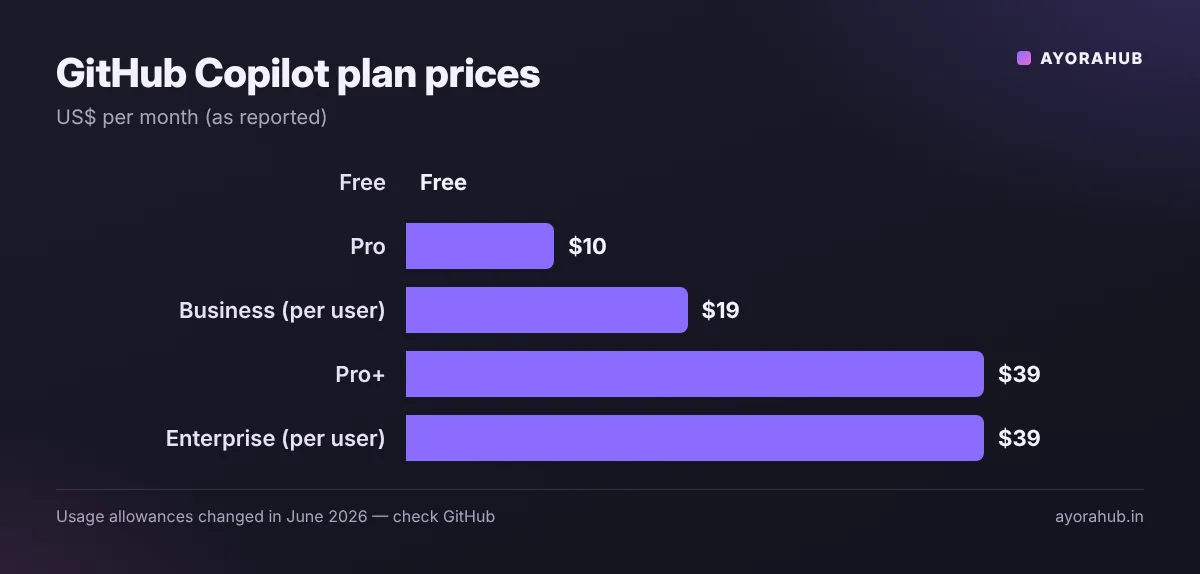
Important: GitHub reportedly moved from “premium requests” to usage-based AI credits in June 2026, and one report says new self-serve sign-ups for some plans were paused in April 2026. Allowances therefore vary by plan and date — check GitHub’s official plans page before buying.
GitHub Copilot vs alternatives
| GitHub Copilot | Cursor | Claude Code | |
|---|---|---|---|
| Works in | VS Code, JetBrains, GitHub | Its own editor | Terminal and IDEs |
| Entry paid price | $10/month | Check vendor | With Claude Pro ($20/month) |
Swipe to see more →
Compare tools in software comparisons · see Claude for Claude Code.
GitHub Copilot pros and cons
| Pros | Cons |
|---|---|
| Works inside popular IDEs (VS Code, JetBrains) | Billing model changed in 2026 — allowances vary |
| Free plan to try it | Suggestions can be wrong or insecure — review everything |
| Business and Enterprise options for teams | Some self-serve sign-ups reportedly paused in 2026 |
More guides: best AI chatbots of 2026 · best AI tools for students · all AI tool guides.
How to get started with GitHub Copilot
- Sign in to GitHub and enable Copilot from your account settings (Free or a paid plan).
- Install the Copilot extension in VS Code or a JetBrains IDE.
- Write a comment describing the function you need and review the suggestion.
- Never accept code you don’t understand; run tests before committing.
Frequently asked questions about GitHub Copilot
Is GitHub Copilot free?
Yes, there is a free plan with limited usage. Pro costs $10 per month (as reported).
Is GitHub Copilot free for students?
GitHub has offered free access to verified students; check current eligibility because sign-ups were reportedly paused for some plans in 2026.
What changed in GitHub Copilot billing in 2026?
Reports say GitHub moved to usage-based AI credits in June 2026; allowances differ by plan.
Which IDEs does Copilot support?
VS Code, Visual Studio, JetBrains IDEs and others, plus github.com.
Pricing section updated November 2026. Sources: GitHub Docs – Copilot plans; BenchLM – GitHub Copilot pricing, plans and credits; UserJot – GitHub Copilot pricing guide.
Limitations
- Suggestions may be insecure, incorrect, inefficient or inconsistent with project conventions.
- Never merge generated code without review, tests and security checks.
- Understand your organisation’s policy for proprietary code and AI services.
Prompt template
Context: [language, framework, relevant files]. Goal: [specific change]. Constraints: preserve existing public interfaces, follow project conventions, avoid unrelated refactors. Before coding, state assumptions and propose a minimal plan. Include tests and explain edge cases.Example prompts
- “Write unit tests for this function, including boundary cases and invalid inputs. Do not change the function itself.”
- “Explain the likely cause of this error, list two hypotheses and show how to test each before suggesting a fix.”
- “Review this diff for security, performance and maintainability risks. Refer to specific lines and distinguish definite bugs from concerns.”
Recommended workflow
Keep changes small, read every diff, run tests and linters, and ask for reasoning about trade-offs rather than accepting code on confidence alone.