
What is Google Gemini?
Gemini is Google’s AI assistant and model family. The consumer experience and available features may vary by country, account type and plan.
Key capabilities
- Conversational help with explanations, planning and writing.
- Brainstorming, summarising and transforming information into structured formats.
- Support for supported multimodal inputs and Google ecosystem workflows where available.
- Learning assistance through examples, practice questions and iterative explanations.
Benefits
Worth evaluating if your workflow already uses Google services or you want one assistant for several types of everyday tasks.
Gemini plans and pricing (November 2026)
| Plan | India price (as reported) | US price (as reported) | Storage |
|---|---|---|---|
| Gemini (free) | ₹0 | $0 | 15 GB (standard Google account) |
| Google AI Plus | ₹399/month | $4.99/month | 400 GB |
| Google AI Pro | ₹1,950/month | $19.99/month | Reported 5 TB |
| Google AI Ultra | From ₹6,500/month (5x tier); ₹19,500 (20x tier) | Higher tiers – check Google’s page | Reported 30 TB |
Swipe to see more →
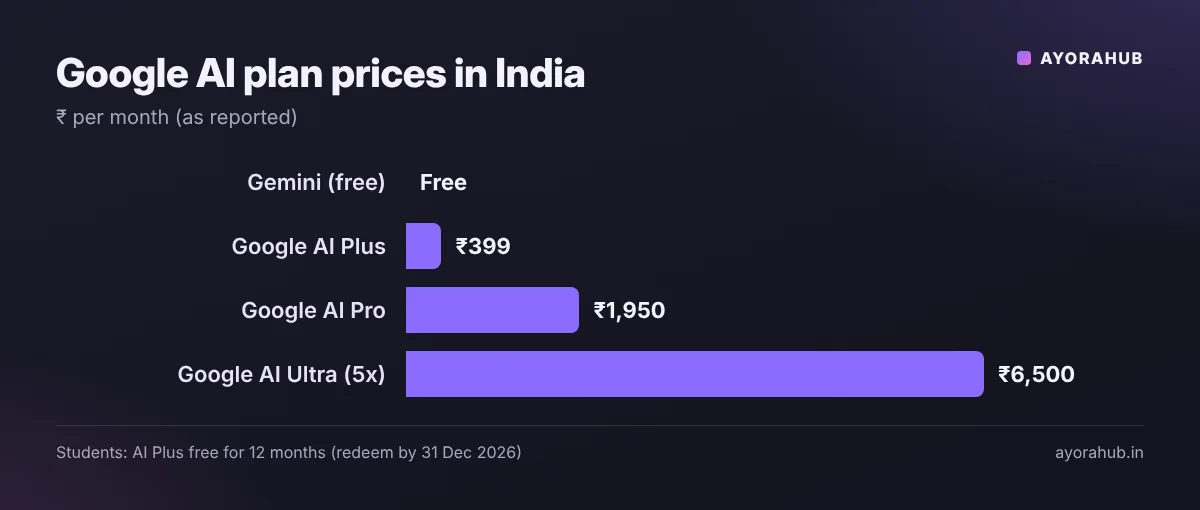
Full breakdown, offers and which plan to choose: Google Gemini plans in India. Always confirm on Google’s official subscriptions page.
Free and discounted Gemini offers
- College students in India: Google AI Plus free for 12 months for eligible students; reported redemption deadline 31 December 2026. After the free year it renews at the regular price unless cancelled.
- Jio users: a Jio offer has been reported for eligible users on qualifying unlimited 5G plans — check the MyJio app for current terms.
Gemini in Hindi and Indian languages
Gemini Live — the voice conversation mode — supports Hindi and eight more Indian languages: Bengali, Gujarati, Kannada, Malayalam, Marathi, Tamil, Telugu and Urdu. You can also type in Hindi or Hinglish. Compare Hindi support across assistants in ChatGPT vs Gemini vs Claude for Hindi users.
Gemini vs ChatGPT vs Claude at a glance
| Gemini | ChatGPT | Claude | |
|---|---|---|---|
| Known for | Google apps, Android, Hindi voice | All-round assistant, images, voice | Long documents, writing, coding |
| Cheapest paid plan (India) | AI Plus – ₹399 | Go – ₹399 | Pro – reported ₹1,999+ |
| Extra storage included | Yes (from 400 GB) | No | No |
Swipe to see more →
More: ChatGPT vs Google Gemini · Best AI chatbots of 2026.
How to get started with Gemini
- Open gemini.google.com or install the Gemini app (on many Android phones it is already built in).
- Sign in with your Google account.
- Tap the microphone or Live button to talk in Hindi or English.
- Upgrade to AI Plus if you need more usage, Gemini inside Gmail and Docs, or more storage.
Frequently asked questions about Gemini
Is Gemini free?
Yes. The Gemini app is free, including Gemini Live voice. Paid Google AI plans add higher limits, app integrations and storage.
What is the price of Gemini Pro in India?
Google AI Pro is listed at ₹1,950/month in India (as reported, November 2026).
Can I talk to Gemini in Hindi?
Yes. Gemini Live supports Hindi and eight other Indian languages.
Is Gemini better than ChatGPT?
Gemini is better if you rely on Google’s apps or want Hindi voice; ChatGPT is a stronger all-round app for many people. Both have free plans, so try both.
Pricing section updated November 2026. Sources: Google – Gemini subscriptions (India); eChai – AI plan prices in India; Whizi – Gemini pricing; Beebom – Gemini Live in Indian languages.
Limitations
- Responses may be inaccurate; independently verify important information.
- Connected-app access and advanced features are not universal and may depend on settings or subscription.
- Check privacy settings before sharing sensitive material.
Prompt template
I need help with [goal]. My current context is [context]. Give me a practical answer in [format]. Separate confirmed facts from assumptions, identify anything that may be out of date, and provide a short checklist I can act on.Example prompts
- “Build a 14-day study plan from this syllabus with daily tasks and spaced revision.”
- “Turn these meeting notes into decisions, owners, deadlines and open questions.”
- “Explain this concept for a beginner, then give me a harder example to solve myself.”
How to choose
Test the exact Google-connected workflows you need, and compare source quality, supported inputs, account requirements and plan restrictions.