
What is ChatGPT?
ChatGPT is a conversational AI assistant designed to help users explore ideas, draft and revise text, learn concepts, reason through problems, write code and work with supported inputs. Capabilities vary by plan, region and product updates, so check the official product page for current availability.
Key capabilities
- Conversation and explanation: ask follow-up questions, request examples, and adjust the level of detail.
- Writing and editing: outline articles, improve clarity, adapt tone, and generate first drafts.
- Problem-solving and learning: break a complex topic into steps, test understanding, and build practice exercises.
- Data and file workflows: where supported, work with uploaded files or structured information and ask for summaries or analysis.
- Multimodal tasks: depending on current access, use image, voice or other supported inputs.
Benefits
Useful for accelerating first drafts, getting unstuck, exploring alternatives, and turning a vague request into a structured workflow. It can adapt its output to your audience, format and constraints.
Limitations to understand
- Outputs can contain errors or fabricated details; verify important claims against trustworthy sources.
- It may miss context, misunderstand an ambiguous request or sound confident when uncertain.
- Do not paste sensitive personal, customer or business data unless you understand the service’s data controls and your organisation’s rules.
- Features, usage limits and prices can change by plan and region.
Prompt formula that works
Give the AI a role, goal, context, constraints, output format and quality checks. Then ask it to identify missing information before producing the final result.
Act as a [relevant expert]. Help me achieve [specific goal].
Context: [background and audience].
Constraints: [length, tone, budget, tools, deadline].
Deliver: [exact output format].
Quality check: list assumptions, flag uncertain facts, and tell me what I should verify.
Example prompts
- Learn: “Teach me [topic] from beginner to intermediate. Use a simple explanation, a real-world example, a common misconception and five quiz questions. Wait for my answers before revealing solutions.”
- Write: “Create three outlines for an article about [topic] for [audience]. Compare their strengths, recommend one, and do not invent statistics or sources.”
- Analyse: “Review the data I provide. State the method, show calculations, identify missing values and distinguish observed facts from possible explanations.”
Who should consider it?
Students, writers, researchers, developers and teams who want a flexible assistant for a wide range of text and knowledge tasks. It works best when a human supplies context and checks the result.
How to compare alternatives
Compare the actual task you need, quality on your own examples, supported file types, research citations, privacy controls, usage limits, integrations and total cost. A single generic “best AI” ranking is less useful than testing the same task across shortlisted tools.
Visit the official ChatGPT website ↗
ChatGPT plans and pricing (November 2026)
| Plan | Price in India (as reported) | Best for |
|---|---|---|
| Free | ₹0 | Casual use, students (includes Study Mode) |
| Go | ₹399/month | Regular users who hit free limits |
| Plus | ₹1,999/month | Daily work use |
| Pro | Reported ₹10,699–₹19,900/month (sources differ) | Power users |
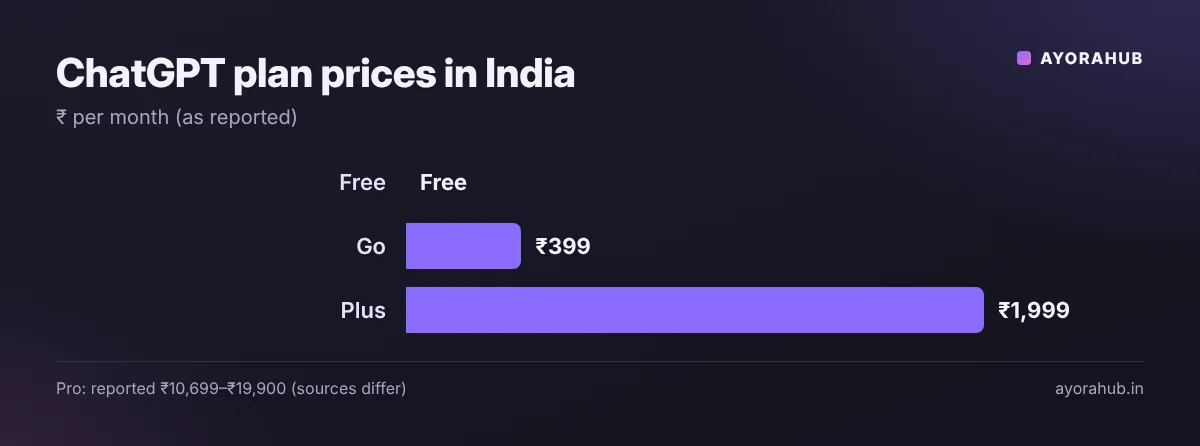
The 12-month free ChatGPT Go offer in India ended for new users on 21 January 2026 (as reported). Full breakdown: ChatGPT price in India.
ChatGPT vs alternatives
| ChatGPT | Gemini | Claude | |
|---|---|---|---|
| Known for | All-round assistant, images, voice | Google apps, Hindi voice | Long documents, writing, coding |
| Cheapest paid plan (India) | Go – ₹399 | AI Plus – ₹399 | Pro – reported ₹1,999+ |
Swipe to see more →
Compare: ChatGPT vs Gemini · ChatGPT vs Claude · Perplexity vs ChatGPT · DeepSeek vs ChatGPT.
ChatGPT pros and cons
| Pros | Cons |
|---|---|
| Strong all-rounder: writing, study, images, voice | Free plan has usage limits |
| Cheapest paid plan in India (Go, ₹399) | Can make factual mistakes — verify important answers |
| Huge ecosystem and integrations | Go plan reportedly shows ads |
More guides: best AI chatbots of 2026 · best AI tools for students · all AI tool guides.
How to get started with ChatGPT
- Go to chatgpt.com or install the ChatGPT app and sign in with email, Google, Microsoft or Apple.
- Start on the Free plan; try Study Mode for learning or upload a document to summarise.
- Use clear prompts: say who you are, what you need and the format you want.
- Upgrade to Go or Plus only if you regularly hit the free limits.
Frequently asked questions about ChatGPT
Is ChatGPT free?
Yes. The Free plan has usage limits and includes Study Mode. Paid plans in India start with Go at ₹399/month (as reported).
Is ChatGPT Go still free in India?
Not for new users — the free promotion ended on 21 January 2026 (as reported).
Can ChatGPT reply in Hindi?
Yes. You can type in Hindi or Hinglish and ask for replies in the same style.
Which is better, ChatGPT or Gemini?
ChatGPT is a strong all-rounder; Gemini is better if you rely on Google apps or want Hindi voice. Both have free plans.
Pricing section updated November 2026. Sources: DesiBundle – ChatGPT price in India 2026; ChatGPT Go free in India: what happens after 12 months.