
What is Perplexity?
Perplexity is an AI-powered answer and research product. Its interface is designed to help users ask questions and inspect sources linked to generated responses.
Key capabilities
- Search-oriented question answering with source links.
- Follow-up questions to narrow or deepen a research question.
- Research and file-related features depending on current plan and product configuration.
- Useful starting point for gathering a source list and building a research outline.
Benefits
Source links can make it faster to inspect where an answer came from, compared with a response that provides no citations.
Perplexity plans and pricing (November 2026)
| Plan | Price (as reported) | Best for |
|---|---|---|
| Free | $0 | Everyday questions with cited sources; limited advanced searches |
| Education Pro | $10/month | Verified students and educators |
| Pro | $20/month (about $200/year) | Regular research, more advanced searches and models |
| Max | $200/month | Power users who need the highest limits and newest features |
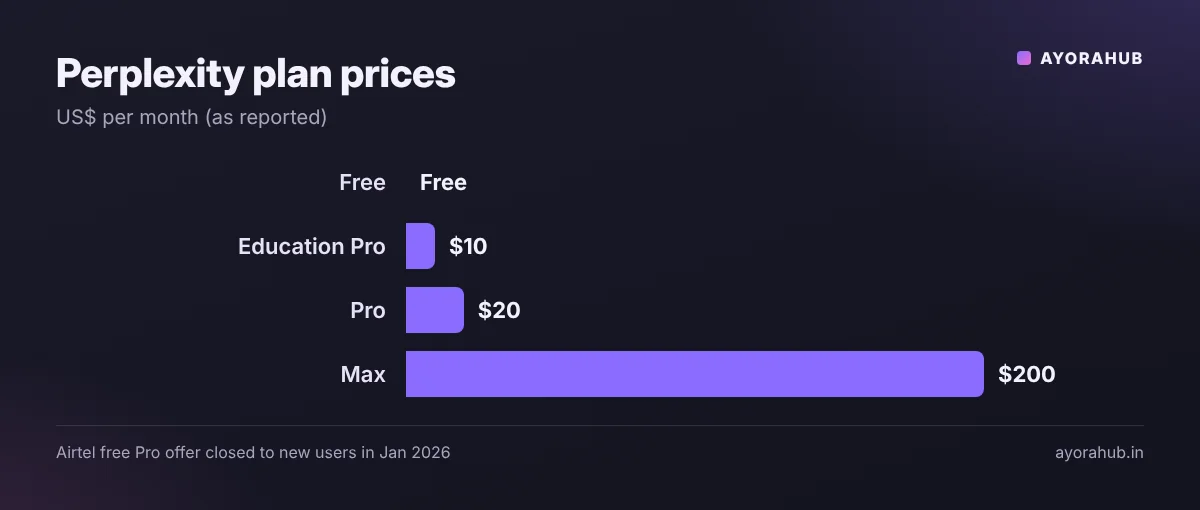
We could not confirm an official rupee price for Perplexity Pro; check the price shown in your app store or on Perplexity’s website before subscribing.
Airtel free Perplexity Pro offer — ended
Airtel’s free one-year Perplexity Pro offer closed to new users in January 2026. People who claimed it earlier keep access for their original 12 months. Some users were later asked to add card details, so check your billing settings to avoid an unexpected renewal charge.
Comet: Perplexity’s AI browser
Comet is Perplexity’s web browser with an AI assistant built in. It can summarise the page you are reading, answer questions about it and help with tasks while you browse. Comet is now free to download on desktop and mobile (as reported); some advanced agent features require Pro or Max.
Perplexity vs ChatGPT vs Google Search
| Perplexity | ChatGPT | Google Search | |
|---|---|---|---|
| Answer style | Direct answer with numbered sources | Conversational answer; sources when it searches | Links, plus AI summaries for some queries |
| Best for | Research and fact-checking | Writing, learning, creating | Finding specific websites, local results |
| Free | Yes | Yes | Yes |
Swipe to see more →
Read the full comparison: Perplexity vs ChatGPT, and Claude vs Perplexity.
How to get started with Perplexity
- Open perplexity.ai or install the Perplexity app.
- Ask a full question, for example “What changed in Google AI plan prices in India this year? Cite sources.”
- Open at least one or two of the numbered sources to confirm the key facts.
- Use follow-up questions to narrow the answer, and save useful threads.
Frequently asked questions about Perplexity
Is Perplexity free?
Yes. The free plan includes cited answers with a limited number of advanced searches per day.
How much is Perplexity Pro?
$20/month (about $200/year). Verified students and educators can get Education Pro at $10/month (as reported).
Is the Airtel Perplexity Pro offer still available?
No. It closed to new users in January 2026.
Is Perplexity better than Google?
For research questions where you want a summarised answer with sources, many people prefer Perplexity. For finding a specific website, local results or shopping, Google is usually better.
Pricing section updated November 2026. Sources: Is Perplexity Pro worth it in 2026?; ToolRadar – Comet review; Free Press Journal – Airtel ends Perplexity Pro offer.
Limitations
- A citation does not guarantee the linked source supports the exact claim; open and verify it.
- Search coverage, model choice, quotas and advanced research features can differ by plan.
- Use primary sources for legal, medical, financial and other high-stakes questions.
Research prompt
Research [question] for [purpose]. Prioritise primary sources and official documentation. For each major claim, provide the source title, date, link and the exact claim it supports. Separate facts, expert interpretation and unresolved questions. Tell me when evidence is insufficient.Example prompts
- “Compare the official documentation for [A] and [B]. List differences, dates and source links.”
- “Find the latest official guidance on [topic]. Distinguish publication date from the date the rule took effect.”
- “Build a balanced research brief with evidence for, evidence against and open questions.”
Best practice
Use the tool to discover sources, then inspect the original pages and record when you checked them. Never treat a generated answer as a substitute for source review.